


-
I. Core Products and Basic Requirements for Large Models
-
1. Existing Product Parameters
- Current product with the highest standalone configuration: Built-in products of the 235B series, with a maximum capacity of 79GB
- Limitations of existing hardware: Unable to install higher-level large models (requiring over 130GB of capacity), necessitating the combination of multiple hosts for expansion
-
2. Requirements for Target Large Model
- Capacity requirement for the large model: Over 130GB to support the "QWEN3-235B-A22B-Thingking-2507" large model with Q4KM quantization precision
- Necessity of hardware expansion: A single existing host cannot meet the installation requirements at all; a combination of 2 or 3 hosts is required
- II. Hardware Configuration Solutions (2-Host/3-Host Combination)
-
1. General Hardware Requirements
- Version of primary/secondary machines: All machines involved in the combination must be of the 128GB version
- Connection method: Implementing a "one primary + one secondary" layout between the primary machine and secondary machines via USB4 Type-C
-
2. 2-Host Configuration (Basic Solution)
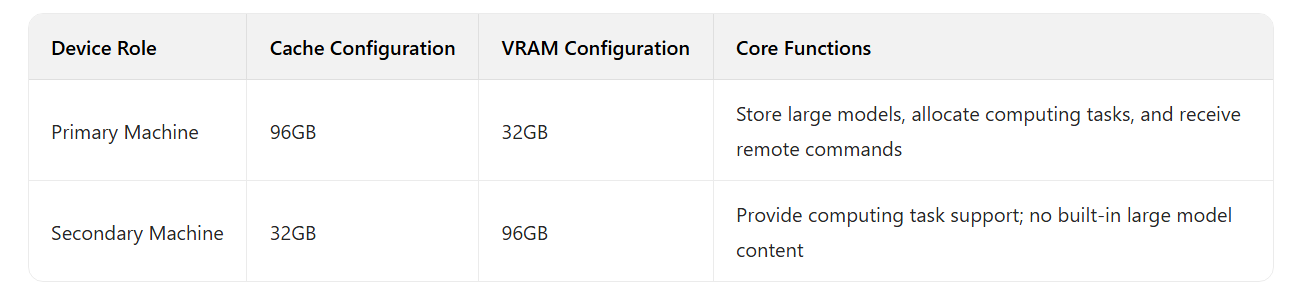
-
3. 3-Host Configuration (Advanced Solution)
- Configuration logic: Consistent with the 2-host solution; only one additional secondary machine is added, and the "one primary + one secondary" layout between the primary machine and secondary machines remains unchanged
- Hardware limitation: The primary machine only supports 2 Type-C interfaces/channels; therefore, it can support a maximum combination of "1 primary machine + 2 secondary machines" (i.e., a maximum of 3 machines)
- III. Software Installation and Device Debugging Process (Step-by-Step)
-
1. Basic Settings for Secondary Machines:
- Step 1: Install "llama.cpp" on the primary machine
- Step 2: Connect all secondary machines to the primary machine via USB4 Type-C interfaces. The core task is to configure the USB4 P2P network and open the firewall ports of the secondary machines (to ensure communication with the primary machine)
- Step 3: Start the llama.cpp RPC service on all secondary machines, allowing the primary machine to call the secondary machines' RPC services via the configured USB4 P2P network and distribute model inference tasks to each secondary machine
-
2. Primary Machine Debugging and Connection:
- Step 1: The primary machine, like the secondary machines, also needs to have "llama.cpp" installed
- Step 2: Similarly, the primary machine needs to be configured for network connection and have its firewall ports opened. Verify that the debugged secondary machines can be called by the primary machine and ensure that the large model service deployed on the primary machine is accessible from external sources
- Step 3: Import any small model into the primary machine, conduct a standalone test, and confirm that the local llama.cpp service operates normally
-
3. Combination Testing:
- Step 1: After the connection is completed, test whether the primary machine can normally recognize the secondary machines and ensure that computing tasks can be distributed from the primary machine to the secondary machines. (If recognition fails, recheck the network configuration and hardware connections)
- Step 2: Import the target large model file (with a capacity of over 130GB) into the primary machine, or import the large model file into a network storage server (e.g., store the large model file on a NAS). However, it is necessary to ensure that the primary machine can access and read the target large model file on the network storage server
- Step 3: Start the local llama.cpp service on the primary machine, call the secondary machines' RPC services via the connection, and implement distributed deployment of the target large model
- IV. Working Principle and Remote Access Process
-
1. Basics of Cloud and Remote Control
- Cloud deployment: Establish a remote address accessible via a web page in the cloud
- Access tool: Any browser can be used to access the cloud service via the remote address
-
2. Computing Task Allocation and Model Operation Logic
- Storage location of the large model: Stored on the primary machine's disk or a network location; no secondary machine needs to have built-in large model files
- Computing task allocation process:Users access the cloud remote address via a browser and send computing commands to the primary machine
- After receiving the commands, the primary machine distributes the computing tasks required for large model operation to the connected secondary machines
- After the secondary machines complete the computing tasks, they feed back the results to the primary machine. The primary machine integrates the results and feeds them back to the user via the remote address
-
3. Usage Method for LAN Clients
- Access permission: Only clients within the LAN (Local Area Network) can directly access the remote web page (no additional configuration required)
- Basis for solution selection: Select a combination of 2 or 3 machines based on the different quantization precision requirements and operation strategies of the large model
- V. Test Results (Verified Solution)
- Test configuration: 3 machines of 128GB version (1 primary machine + 2 secondary machines), running the "QWEN3"-class 235B large model with Q4KM quantization precision and a capacity of 137GB
- Test result: Full test success
- VI. Usage Requirements and Precautions
-
1. Basic Requirements for Users
- Skill requirements: Must have relevant network fundamentals (need to understand basic operations such as LAN, remote access, and port debugging)
- Hardware maintenance awareness: Must use the combined machines as servers
-
2. Requirements for Operational Stability
- Power-on requirement: The machines must be kept in 24/7 continuous operation after startup; mid-operation shutdown is not allowed
- Consequence of shutdown: Once shut down, the process of "debugging connection → starting secondary machine services → starting primary machine services" must be re-executed; otherwise, normal usage will not be possible
-
3. Procurement Recommendations
- Target users: Only recommend users with network fundamentals who need to run 130GB-level 235B large models to purchase multiple machines
- Quantity limitation: Due to the primary machine's "2 Type-C interfaces" limitation, a maximum of 3 machines (1 primary machine + 2 secondary machines) can be purchased
#AI #AMD #AIMax395 #Ryzen #EVO-X2 #AIPC #LLM #LargeModels #LLAMA


